Each language is a separate plan with its own progress, rounds and private recovery link. Switching keeps earlier rounds in their original plan.
Take one small action between coaching sessions
Use this five-step English plan from Act. Check off steps, leave and return, or start a separate new round. Act saves your checklist progress. Write your answers on the worksheet or in your own notes; Act does not save these written answers.
Bring the instructions you already use
Paste a numbered outline. Act keeps each title and puts the lines below it into that step’s instructions.
Before · Your outline
1. Choose one action to practise
Write what you will try before your next session.
2. Try it and take a note
Write one observation to discuss with your coach.
After · Steps to review
- Choose one action to practise
Write what you will try before your next session.
- Try it and take a note
Write one observation to discuss with your coach.
Try one step. Return to your progress.
See how to check a step, return to saved progress and start a separate round in 48 seconds.
Try the free sample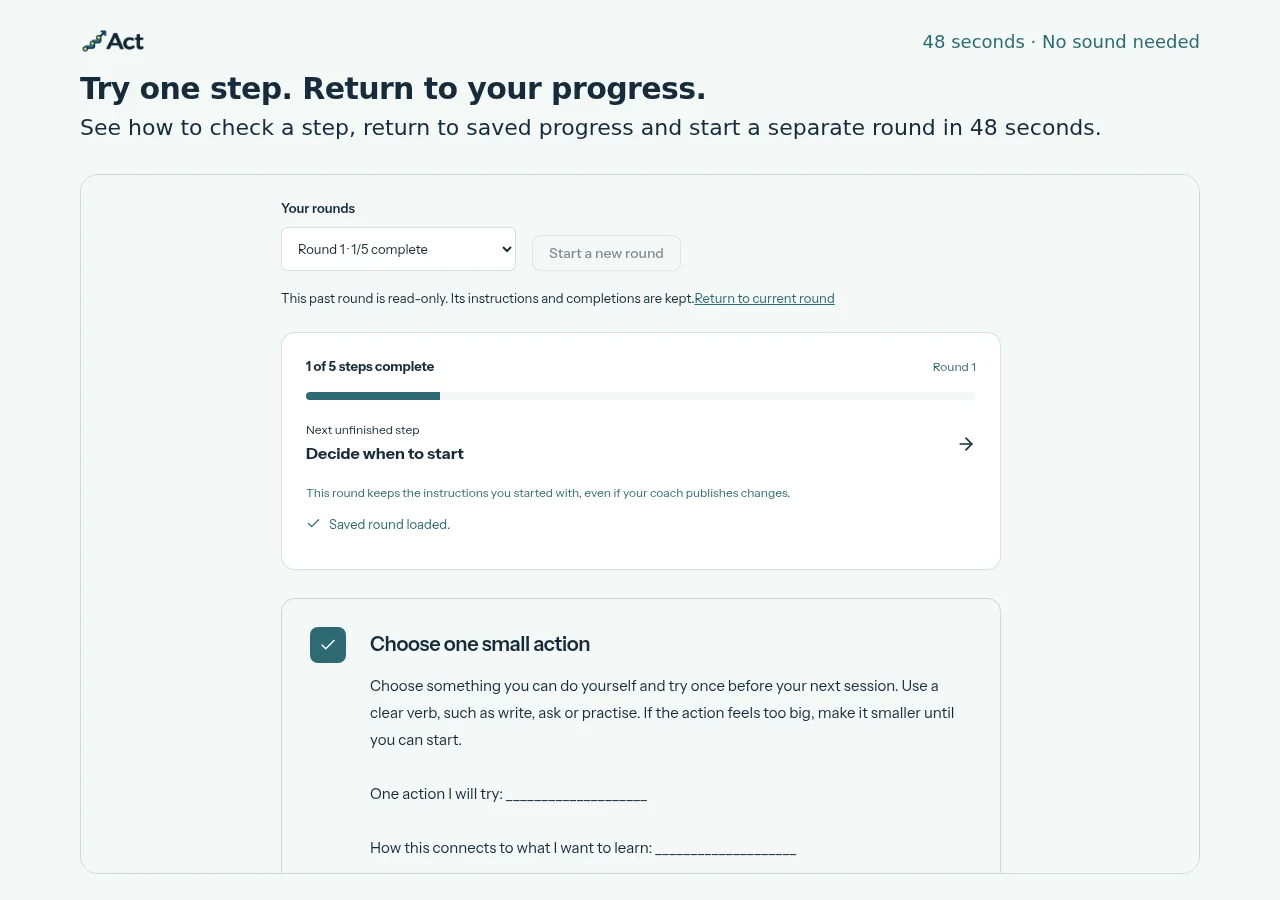
Read the steps instead
Start the free sample
Choose “Start this plan.” No signup or email needed.
Choose one small action
Read the first step. Pick something you can try once.
Check the step you completed
After doing the step, check it. Act saves your checklist progress.
Return to saved progress
Reopen online in the same browser storage: 1 of 5 steps complete.
Start a separate new round
Choose “Start a new round.” Read the explanation before confirming.
Round 2 starts at 0 of 5
The new round starts unchecked. Your first round is not erased.
Revisit Round 1
Choose Round 1 in “Your rounds.” It still shows 1 of 5 steps complete.
Your earlier completed step is still here
Past rounds are read-only. Try your own small step in the free sample.
Small steps between coaching sessions
Read the plan introduction (English)
A five-step action and reflection worksheet Choose one thing from your coaching conversation to try before your next session. Make the action small enough to start, then return to record what you notice. Use a fresh worksheet for each new round and keep earlier sheets to compare what you have learned. Before you act: complete steps 1–2. After your planned start time: complete steps 3–5. Name you would like to use (optional) • Round / start date • Next coaching session (if scheduled) Write only what you feel comfortable keeping. Choose which parts you want to discuss with your coach. Act saves your checklist progress. Write your answers on this worksheet or in your own notes; Act does not save these written answers. Bring it back to your coach: Coaches: invite learners to choose their own action. Help make it smaller if starting is difficult. At the next session, let the learner choose what to share, then ask, “What would you like to keep or adjust next time?” Use the answer to choose the next step together, without scoring. Free worksheet from Act • act@brainer.one
Keep this plan one tap away
Act opens this plan from its home-screen icon. In the same browser storage, your saved progress and selected round return when you’re connected.
Start the plan first to save your progress.
How to add Act on your phone
Android · Chrome
Open this plan in Chrome, not inside LINE or another app. Tap the ⋮ menu, then “Add to Home screen” or “Install app”, and follow the prompts. Menu labels vary by browser and device.
iPhone or iPad · Safari
Open this plan in Safari. Tap Share, then “Add to Home Screen”. If “Open as Web App” appears, keep it on, then tap Add. If the option is missing, use Safari rather than an in-app browser.
Keep your private recovery link before adding.Some devices keep home-screen apps in separate storage. If your progress is missing, open this same plan in Act and paste the complete private recovery link in the recovery field below. This restores access without starting over. Keep the link private; it grants access to your progress.
Adding an icon does not enable offline saving. Act needs a connection to load rounds and save changes. Clearing site data, private browsing or changing devices can remove local return access.
Begin with one useful step
Start without signing in. Act saves each checked or unchecked step to your private progress.
Loading your plan…
Review my progress as a coach
Try one useful step, then review what you marked complete. No sign-in needed.
Your sample progress · Coach view
Review only your own sample steps and rounds, as a coach would. This view does not show other learners’ activity.
Loading your saved sample progress…
Begin with one useful action
Start the sample and do one step that helps you. Mark it complete when you’re ready, then return here to review.
A checkbox records the learner’s choice to mark a step complete. It does not independently verify learning or save written worksheet answers.
Shape this plan for your learners
Sign in to copy the sample content into your own private, unpublished draft. Your sample progress and rounds are not copied. Review and edit the steps before publishing.
- 01
Choose one small action
Choose something you can do yourself and try once before your next session. Use a clear verb, such as write, ask or practise. If the action feels too big, make it smaller until you can start. One action I will try: ____________________ How this connects to what I want to learn: ____________________ I will count this action as done when: ____________________ Instead of “communicate better,” try “draft one open-ended question for my next meeting.”
- 02
Decide when to start
Choose a day, time and place, or connect the action to something that reliably happens. Prepare what you need beforehand. I will start on / at / after: ____________________ Place / what I need to prepare: ____________________ If that time does not work, I will adjust to: ____________________ For instance: on Tuesday, after turning on my work computer, I will draft the question before opening email.
- 03
Act, then record what happened
At your chosen time, try the action. Then choose a status and record what actually happened. If you have not started, note what got in the way so you can choose your next step. Choose one status or option: Did what I planned / Did part of it / Have not started Date / time I acted or returned to reflect: ____________________ What I actually did, or what got in the way: ____________________ If your planned start time has not arrived, return to this step when it does.
- 04
Record one thing you noticed
Describe what happened before interpreting it. Choose one detail about the task, timing, surroundings or what helped you start. If you have not started, notice the obstacle instead. What I actually noticed: ____________________ What this tells me about the approach or conditions I need: ____________________ “I drafted one question before opening email” is clearer than “I did well today.”
- 05
Choose your next step
Use what you noticed to decide whether to try the same action, make it smaller, change your approach or pause to discuss it with your coach. Choose one option, then say what you will do and when. Choose one status or option: Try the same action again / Make it smaller to start more easily / Change the approach or timing / Pause and discuss with my coach My next step / when I will start: ____________________ A question or support I would like to discuss with my coach: ____________________ Start a new round on a fresh worksheet with a new round number and date. Keep this round’s notes without erasing or writing over them.